
[ Razor Academy ]
Cash Flow Planning
Cash flow planning can be automated in RazorPlan by setting a pre-retirement lifestyle and using the Excess Cash Flow Managerto redirect any future excesses toward paying down debts and saving for retirement.
Client Names:
Betty and Bob Jones
Client Description:
Betty and Bob, 42 and 44, are a married couple that are planning to retire at Betty’s age 60. They have saved money in their RRSPs and TFSAs. They plan to continue saving for retirement but also have a line of credit that they would like to pay off as soon as possible.
Betty and Bob are looking for advice on how to pay down their debt and still plan for their retirement.
Strategy Outline:
After reviewing Betty and Bob’s current situation, we identify that their current lifestyle leaves excess cash flow that continues to grow as they pay down debts. Without proper management, it is likely that increases in spending or future debt will erode this future excess. RazorPlan’s excess cash flow manager can quickly demonstrate the impact of using excess cash flow to pay down debt and save for retirement.
Financial Situation Outline:
Their current financial situation includes the following:
- Pre-tax employment income of $95,000 per year for Betty and $75,000 per year for Bob
- A current after-tax lifestyle of $6,500 per month which they want to maintain throughout retirement
- A home valued at $800,000 with a remaining mortgage balance of $450,000 and a payment of $2,700 per month
- A line of credit (LOC) owing $45,000 at 4.25% with a monthly payment of $400
- Betty has an RRSP worth $75,000 saving $250 per month and a TFSA worth $20,000 saving $125 per month
- Bob has an RRSP worth $50,000 saving $250 per month and a TFSA worth $10,000 saving $125 per month
- They both expect to receive CPP and OAS, and Bob will receive $41,250 per year from a company pension starting at age 62
Disclaimer – The results and recommendations outlined in this example are for illustrative purposes only.
The recommendations made are designed to demonstrate functions within RazorPlan and are not intended to act as a guide or real client recommendation.
Note: Due to potential changes in the software or updates to math and taxation, your results may not exactly match the following outline
Problem solution
Current Situation:
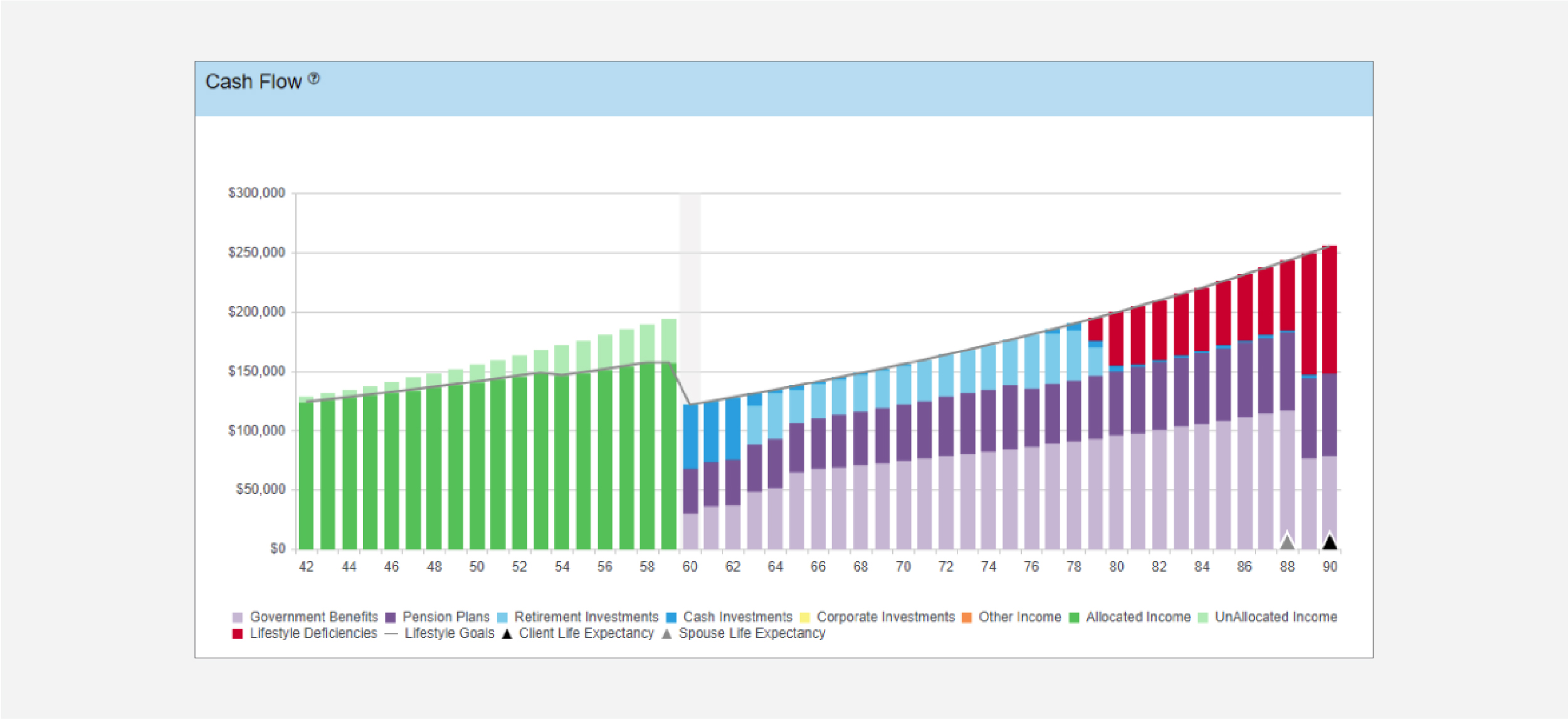
Viewing the couple’s Cash Flow chart shows that there is unallocated income each year prior to their planned retirement at Betty’s age of 60, this is labeled as Unallocated Income. The excess cash flow increases in 11 years when Betty is 53 because the LOC is fully paid off freeing up $400 per month.
This chart also shows that based on the current savings level and rates of return the couple will have retirement income shortfalls starting at Betty’s age 79.
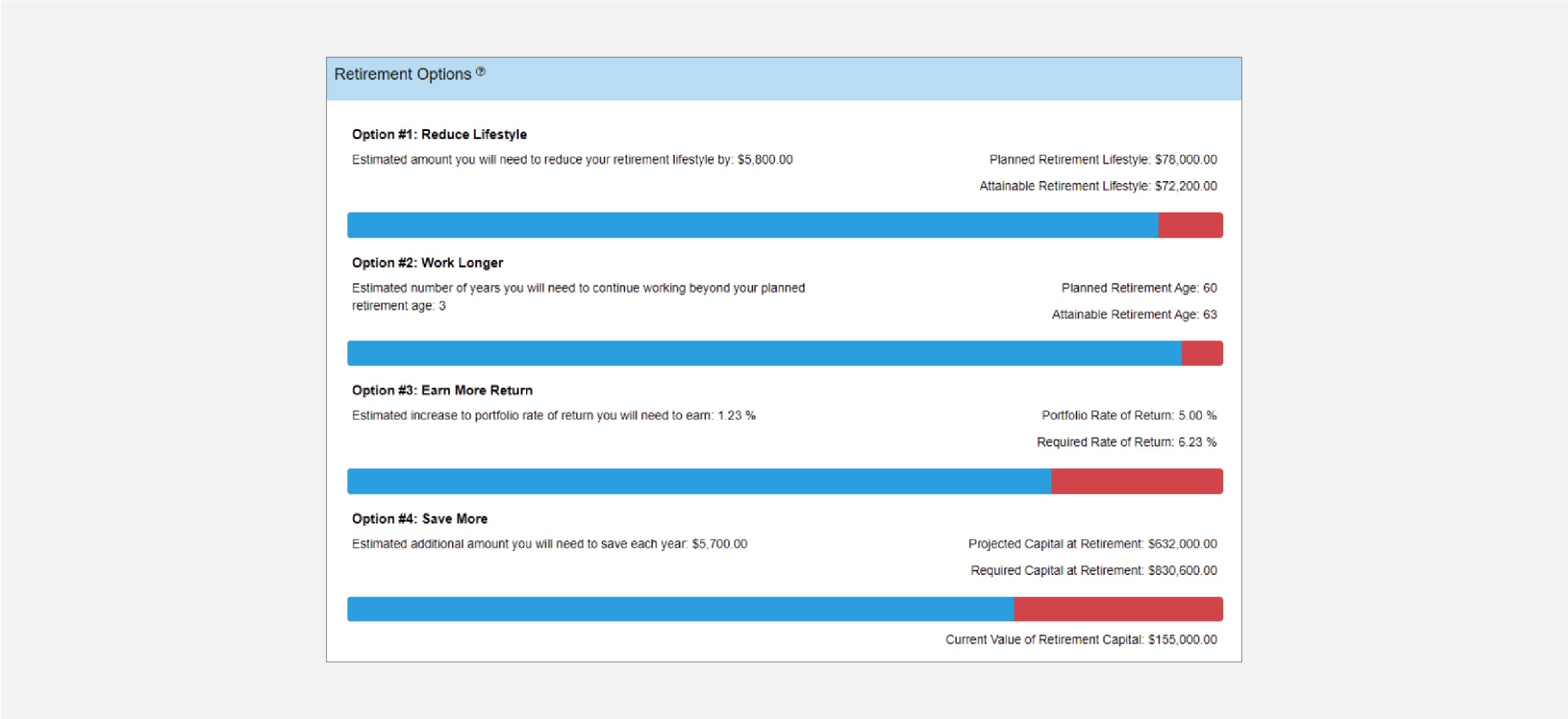
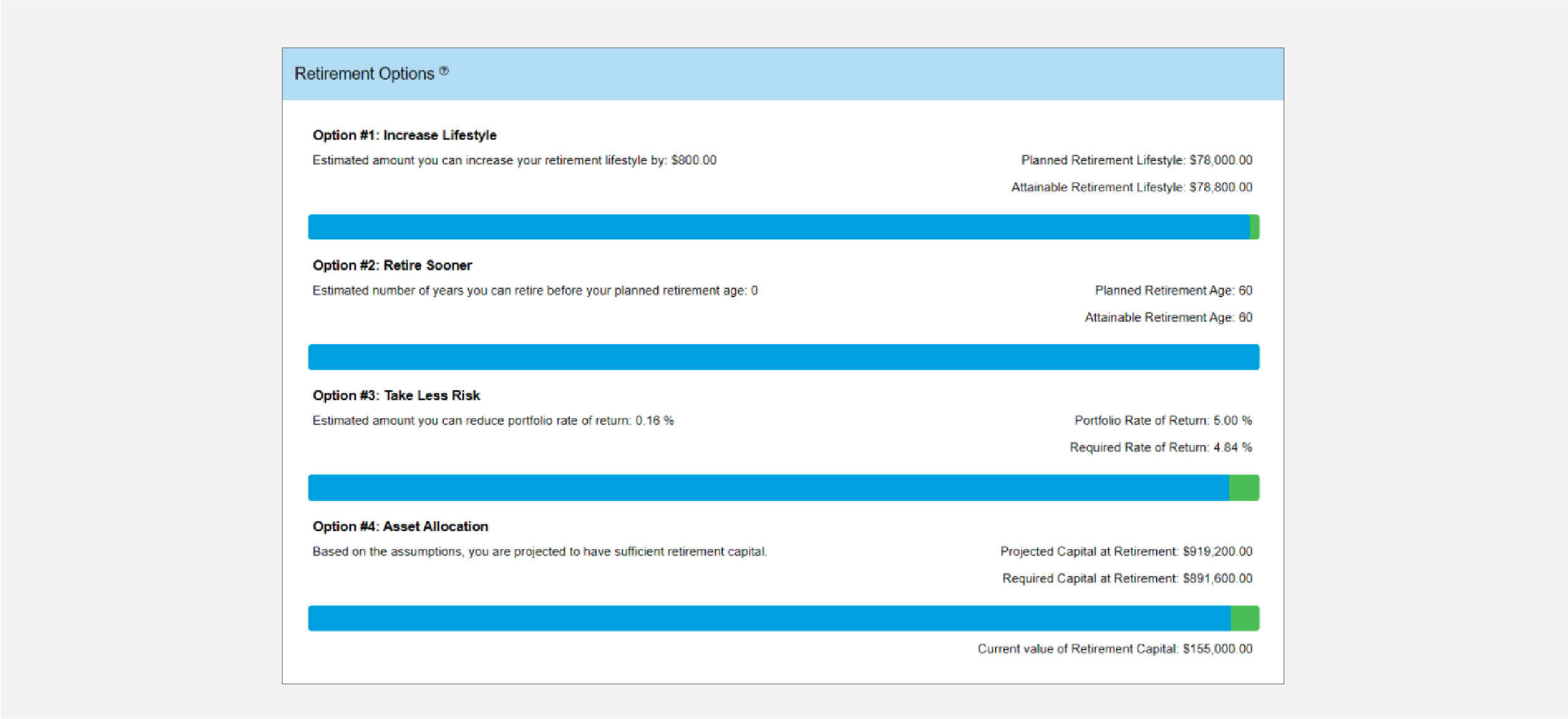
The Retirement Options screen confirms that they are not on track to maintaining their current lifestyle throughout retirement. If the Jones make no changes to their current plans then they will likely have to adjust their planned retirement lifestyle as seen in Option #1. Alternatively, Option #4 states that they could also increase their planned savings today to meet their desired retirement lifestyle.
Recommendations:
After reviewing the Jones’ current situation we can show them that by managing their pre-retirement cash flow and optimizing excesses we can better prepare them for achieving their goals. If they lock down their current lifestyle expenses to only increase with inflation, assuming 2.5%, then in the near future more income will be available for investing. We can do this by making the following recommendations:
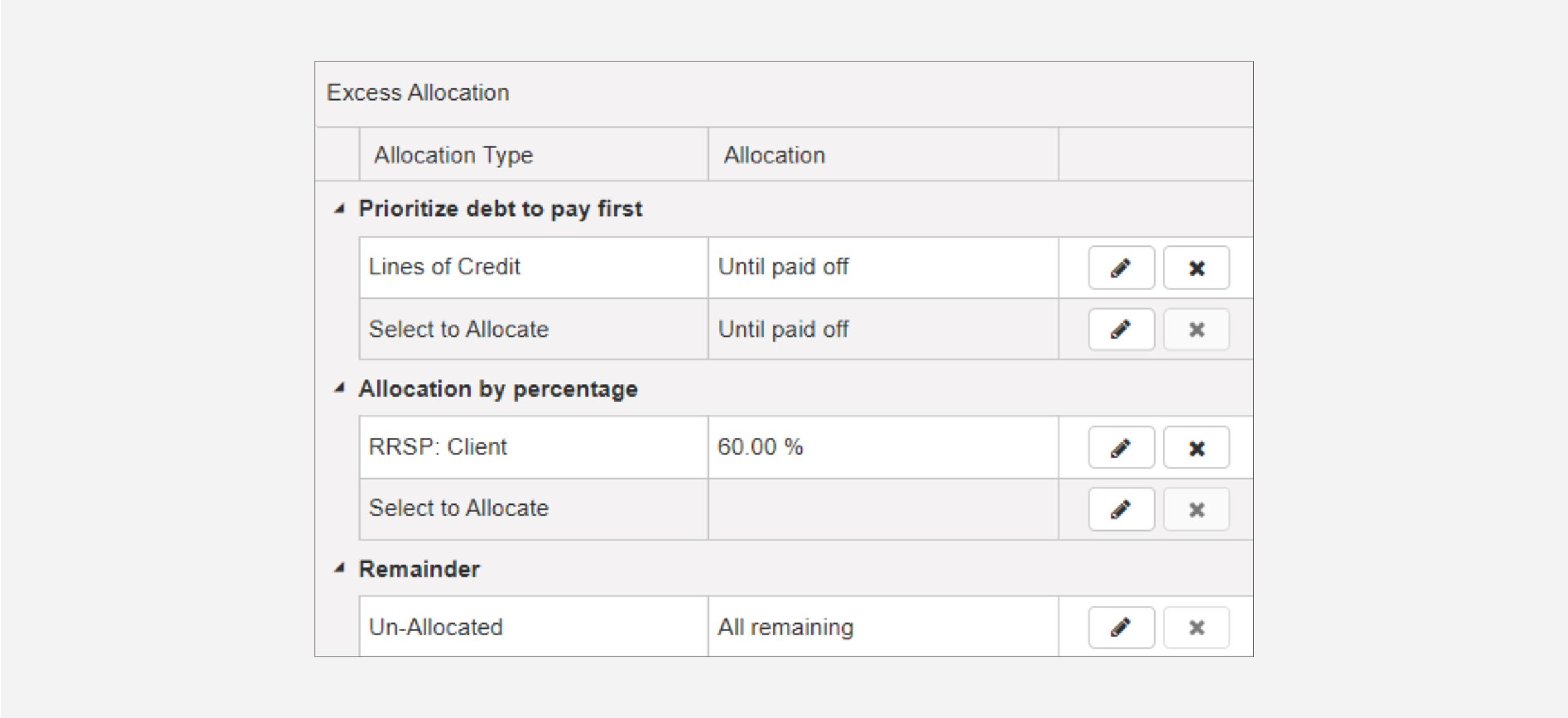
- Direct all excess income to the line of credit until it has been paid off and resist using it moving forward
- Once the line of credit is paid off, direct 60% of excess toward investment accounts, specifically TFSAs
- Leave the remaining 40% unallocated as a buffer for incidental expenses
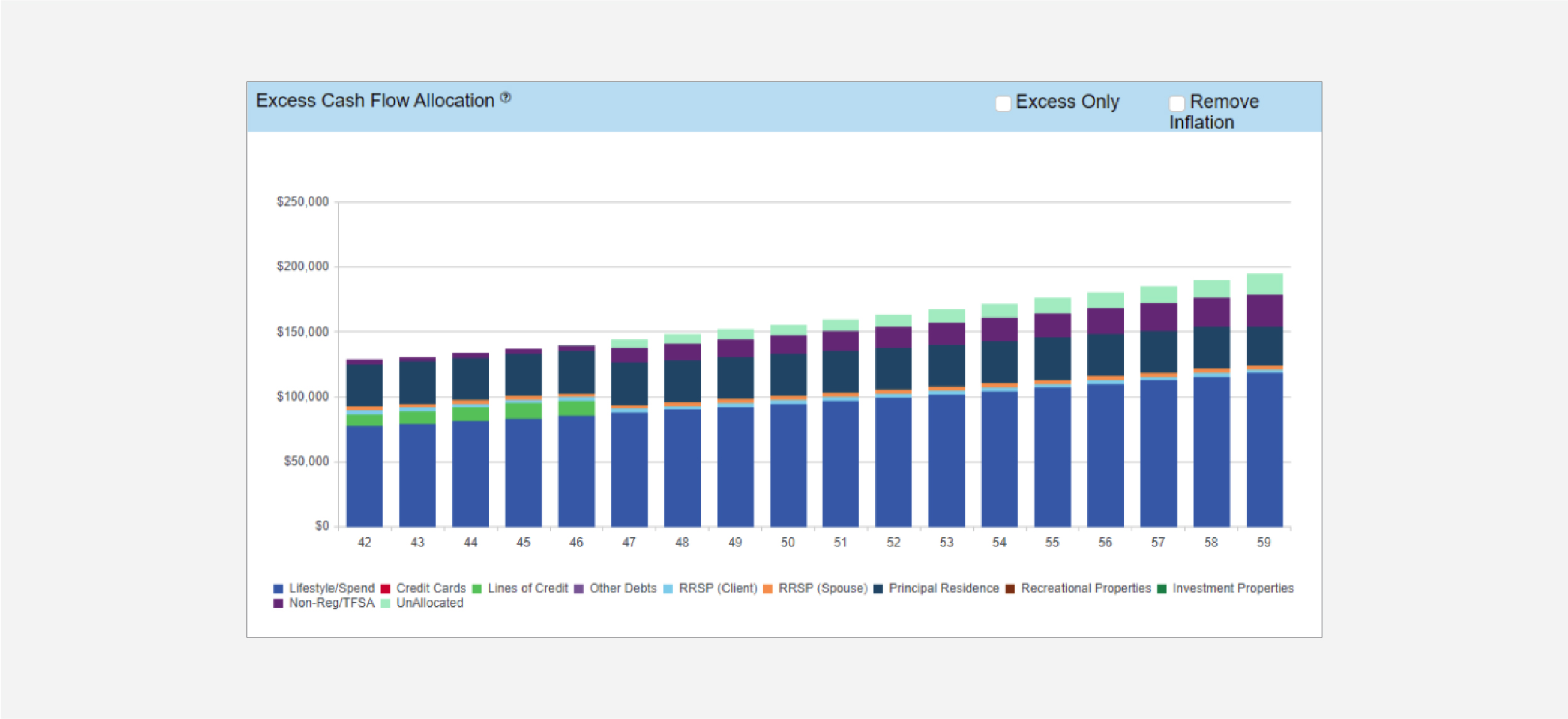
After optimizing the use of their unallocated income, the Excess Cash Flow chart shows that the line of credit will be paid off by the end of the year Betty turns 46. This chart also shows the increase in savings to their TFSAs starting at age 47 and a small portion of unallocated income continuing to retirement.
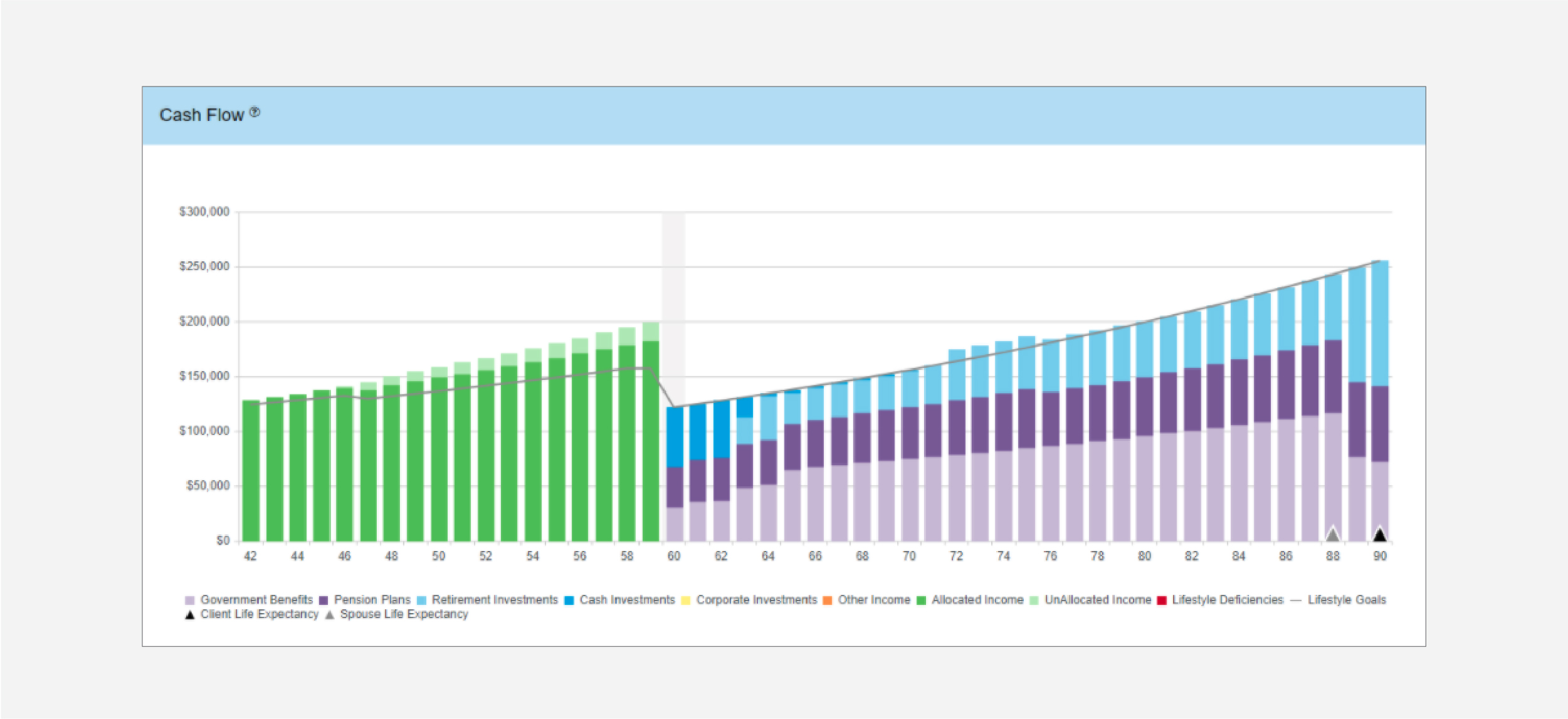
Looking at the Cash Flow chart after making the recommended changes we can see that their desired lifestyle needs are now fully funded right through to age 90.
In addition, the remaining unallocated income could still be utilized should the need arise or should their lifestyle needs increase in the future.
Viewing the Retirement Options screen shows that by paying off their debts over the next 5 years and then increasing the savings for retirement, they will be able to meet their retirement income and age goals.
Delivering Results:
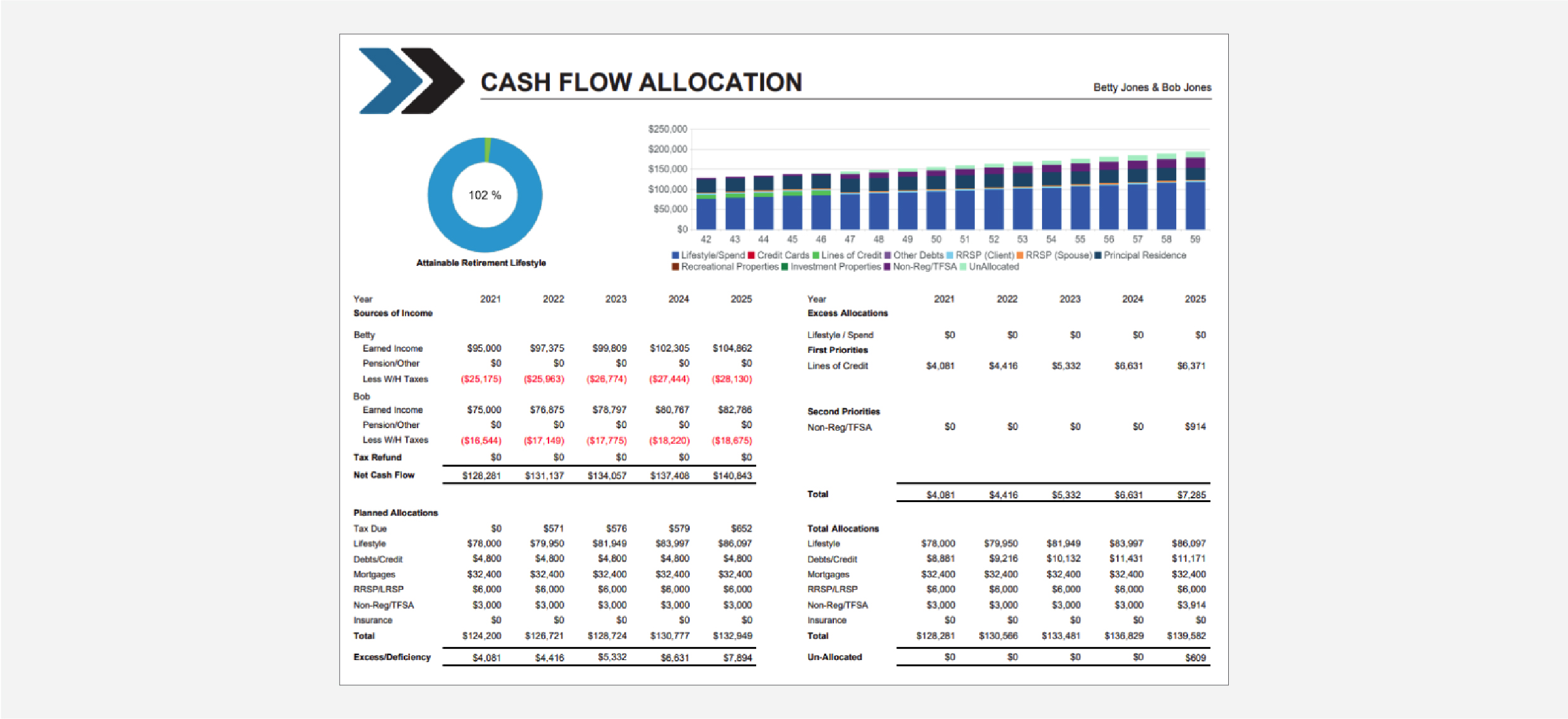
When integrating pre-retirement cash flow planning into a retirement plan, advisors can benefit from using the Cash Flow Allocation report that is provided in RazorPlan. This report can be printed by itself from the Excess Cash Flow manager area of the program. Or it can be included when printing the Full Report so that it is integrated into the plan.
By focusing on the next 5 years, this report makes it easy for the client to understand the changes needed in their pre-retirement cash flow to accomplish their goals. The Excess Allocations section shows the annual changes required according to the recommendations.
How to build with Razorplan
Key Assumptions:
This case requires the following account level assumptions set on the Settings tab in Your Account. Results will vary if these assumptions are not set up in your account.
- Set Stop Income At to Assumed Life Expectancy
- Set Pre-Retirement Cash Flow to On
Select Razor Academy from the RazorPlan home screen.
From there select “Cash Flow Planning” and click Download.
The sample case will download to your RazorPlan account and automatically open.
Click on the Chart button on the RazorPlan toolbar to view the charts of the couple’s current situation.

Before beginning to work with this client file, it is important to create a new scenario to retain the original Base Data scenario. By creating a new scenario you will be able to compare your recommendation to the original scenario.
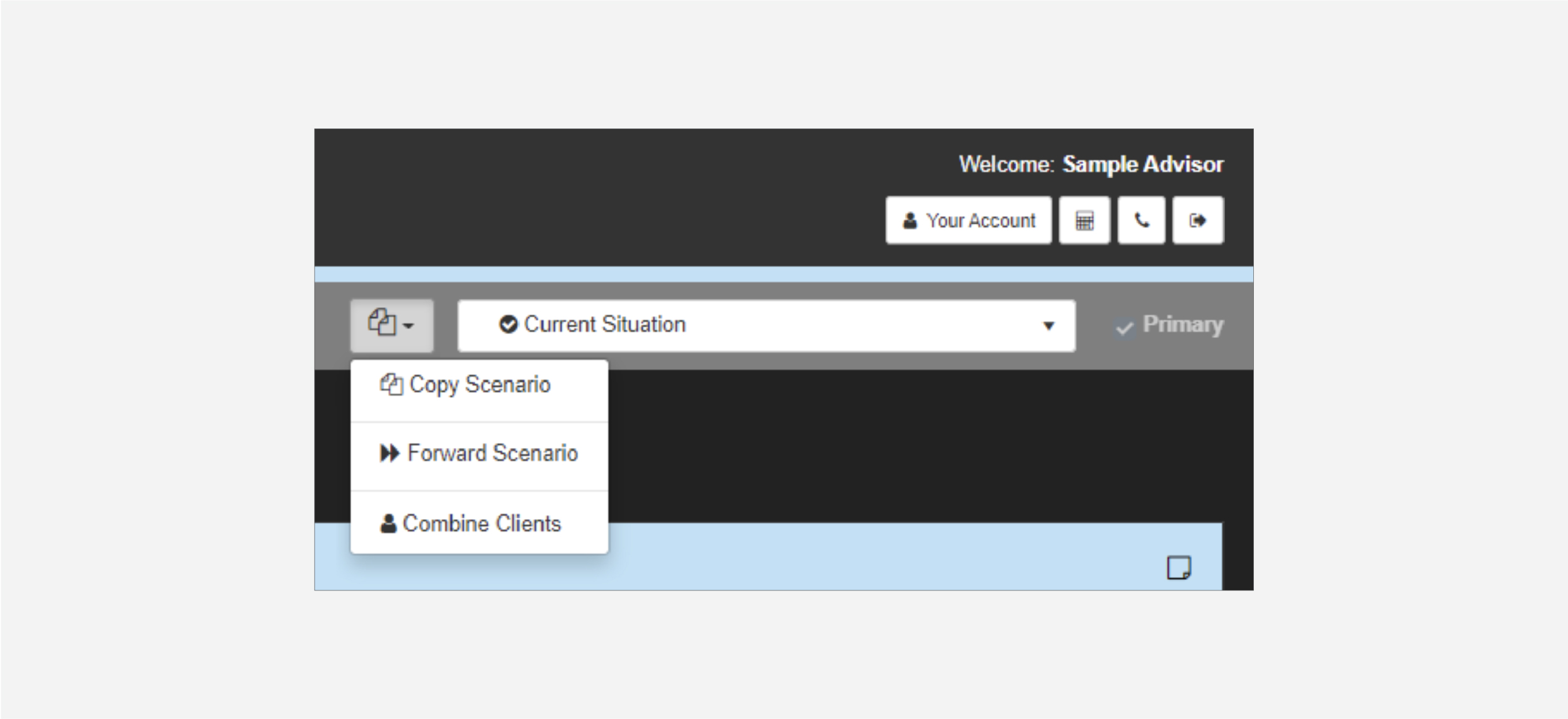
Click the Scenarios drop-down menu and select the Copy Scenario. Name this new scenario “Recommended”. Once created, the new scenario will load. You can return to the Current Situation scenario at any time through the Scenario list drop-down.
To model the recommendations provided in this case, open the Excess Cash Flow Manager and enter the following settings:
There are two ways to print the Cash Flow Allocation document for use with your clients.
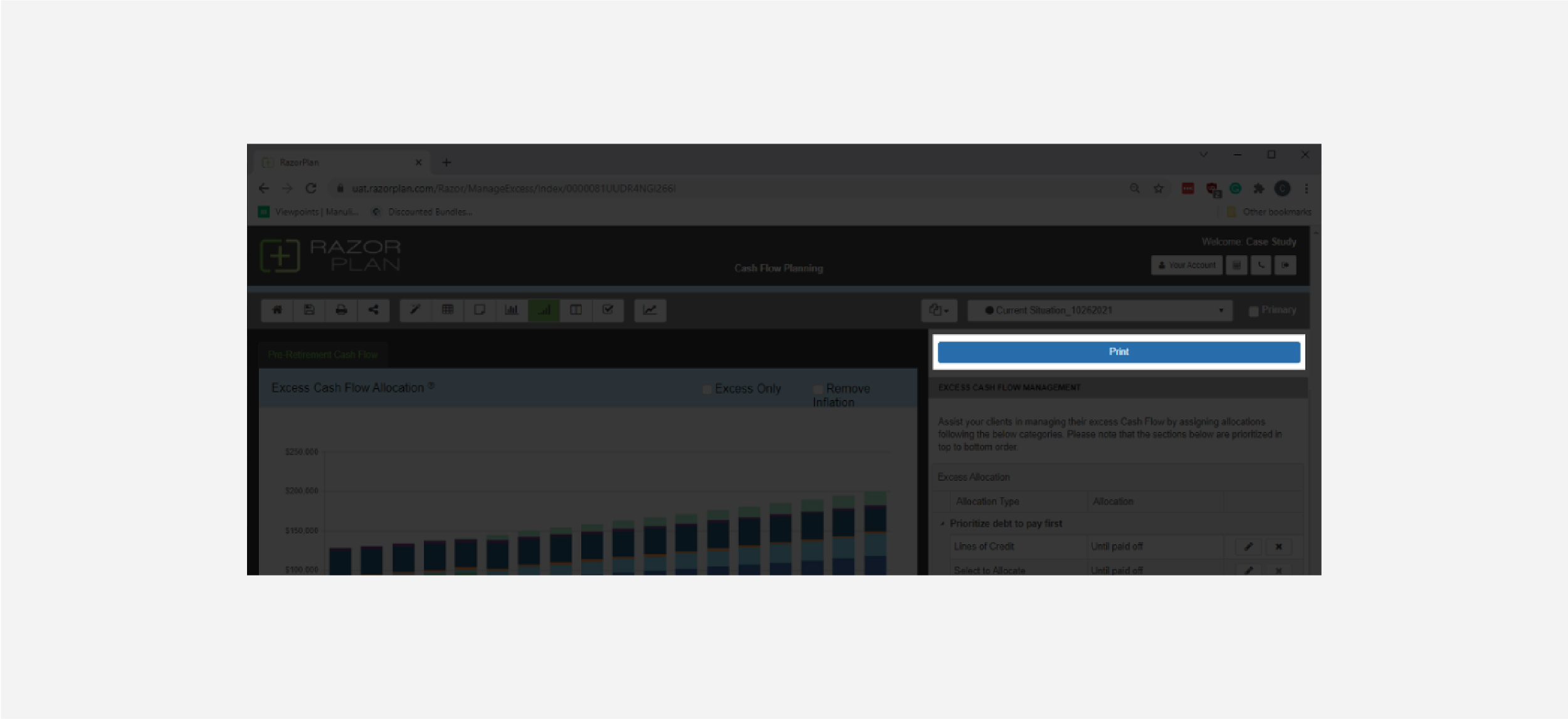
From the Excess Cash Flow manager, you can print the Cash Flow Allocation document using the Print button located above the data entry panel. When using this method, the Cash Flow Allocation document will print along with the cover and disclaimer documents.
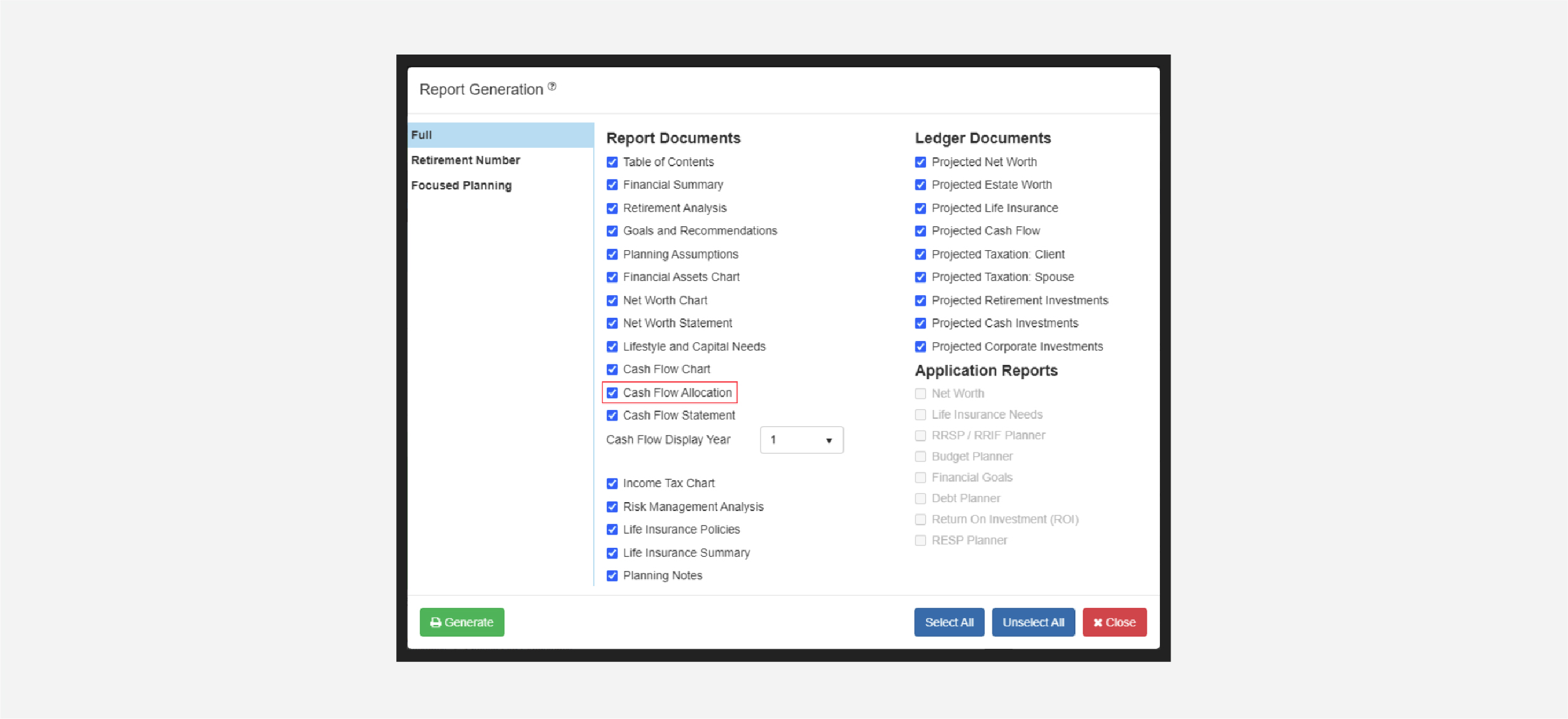
The Cash Flow Allocation document can also be included in the Full Report. To print the Full Report, select the print button from the RazorPlan Toolbar and select the checkbox next to Cash Flow Allocation.
By following these steps, RazorPlan allows you to show the impact proper cash flow management can have on this couple’s ability to meet their goals.

