[ Razor Academy ]

Sandwich Generation Sample File

Can this “Sandwich Generation” couple afford to buy a vacation property on one salary?

Client Names:

Samantha (Sam) Walsh and Michael Donnelly

Client Description:

Samantha (Sam) is 51 and her husband Michael is 56. Sam earns $350,000 a year and Michael retired 3 years ago due to his health. They live in BC where they support Sam’s mother Donna and their son Chad who has 4 years remaining in medical school.

With $7,500 each month of personal living expenses, $2,500 a month support for Donna and $35,000 a year in education expenses, they want to know if they can afford to buy a vacation condo now for $750,000 and still afford to retire at Sam’s age 65.

“We had planned to buy the condo a few years ago, then Michael had his heart attack and had to retire.” Sam tells her advisor when they meet for an annual review.

Strategy Outline:

Sam and Michael have plenty of income and assets, their plan is to purchase a recreational property and maximize their estate at life expectancy.

Financial Situation Outline:

In addition to CPP & OAS they have the following:

Sam’s financial resources

  • $550,000 in RRSP, contribution maximum each year
  • $95,000 in TFSA, contribution maximum each year
  • $750,000 non-registered remaining from her father’s estate

Michael’s financial resources

  • $125,000 in RRSP
  • $95,000 in TFSA, contribution maximum each year

The only other major asset they have is their home which is valued at $1,800,000 and is mortgage free.

Disclaimer – The results and recommendations outlined in this example are for illustrative purposes only.

The recommendations made are designed to demonstrate functions within RazorPlan and are not intended to act as a guide or real client recommendation.
Note: Due to potential changes in the software or updates to math and taxation, your results may not exactly match the following outline

How To Build with RazorPlan:

Review the Current Situation Scenario for an outline of their current situation. Based on what they are currently doing, using the Cash Flow Chart in RazorPlan you can clearly see there are 3 future reductions in cash flow.

The first is at Sam’s age 56 when Chad graduates from med school. The second is when Sam retires at age 65 and stops contributing to her RRSP, and the third is estimated to happen at Sam’s age 72 when her mother reaches her life expectancy at age 95. The RRSP contributions are automatically stopped at retirement, the other 2 amounts were manually entered through the Lifestyle Needs Drill-Down.
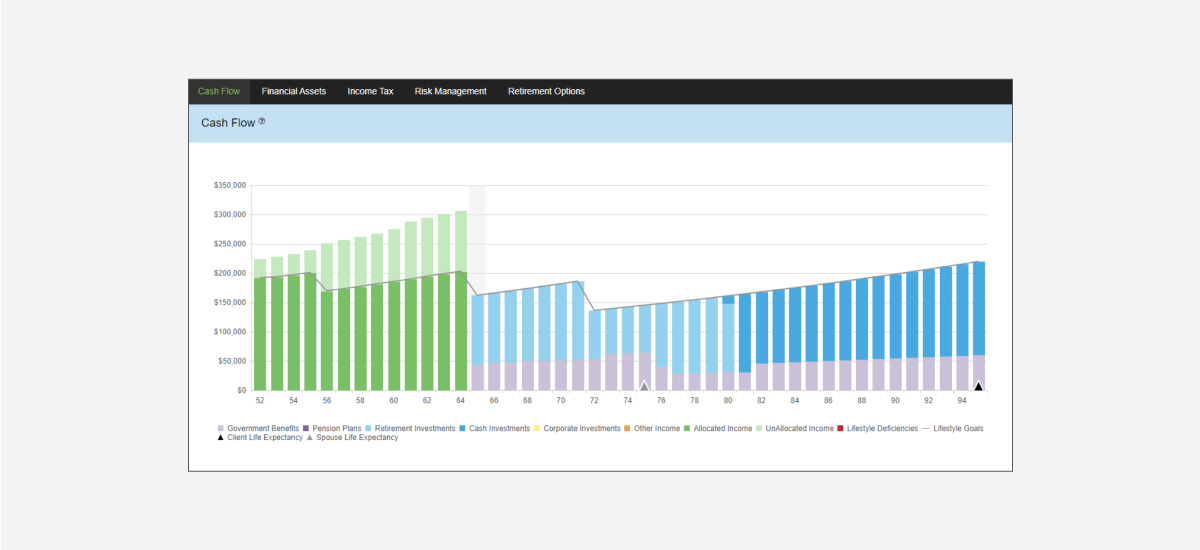
Based on the above, there are significant excess cash flow amounts pre-retirement (unallocated income) that Sam and Michael could use to finance the vacation condo today using a mortgage line of credit.

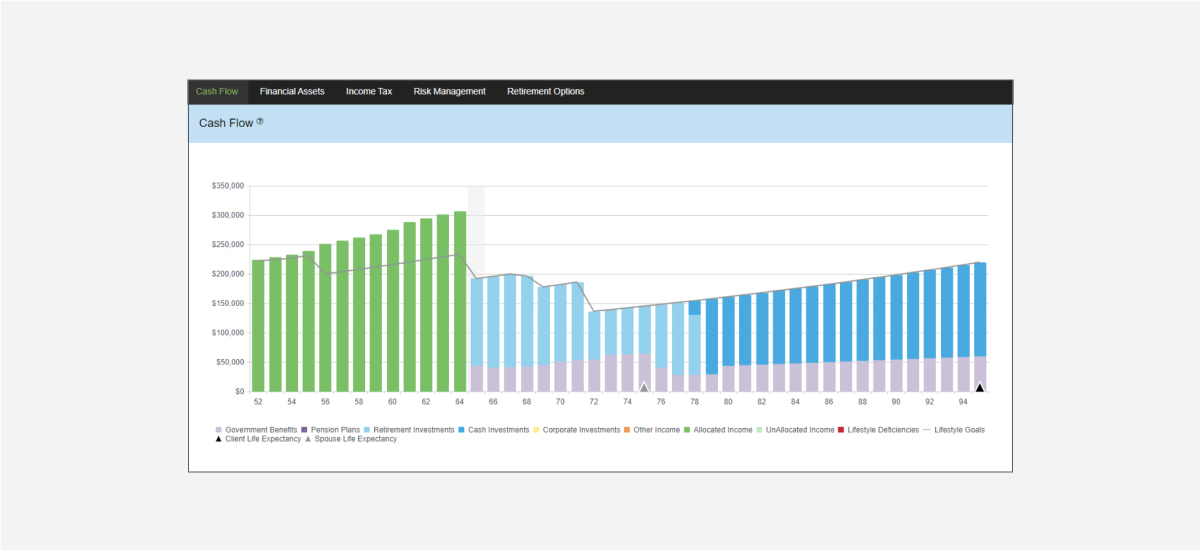
Although Sam could use the non-registered investments she received through an inheritance, they would prefer to use a mortgage line of credit that they already have on their home with the expectation that they pay it off prior to retirement. View the Purchase Vacation Condo – Excess to Mortgage scenario.

Assuming a purchase price of $750,000 fully financed at 3.5% (Real Estate Data Entry), if they apply all excess income (see Current Situation) to the mortgage line of credit (Excess Cash Flow Tool), the vacation condo will be paid off at Sam’s age 69 as illustrated below.
Additional value can be added by better managing income and decumulation in retirement. Their current plan is to draw down on RRSPs first to reduce future taxes payable by their estate. “We thought by drawing from RRSPs first this would reduce tax at death and provide a larger after-tax estate for our son.” Sam said when asked why this is their plan.

Although it can be true that drawing down on RRSP/RRIF investments may result in a larger after-tax estate if you die prior to normal life expectancy, Sam expects to live into her 90s, same as her mother and grandmother. If longevity is expected and the goal is to maximize the after-tax estate value, they should rethink their decumulation strategy. View the Withdraw Non-Registered / TFSA First scenario.
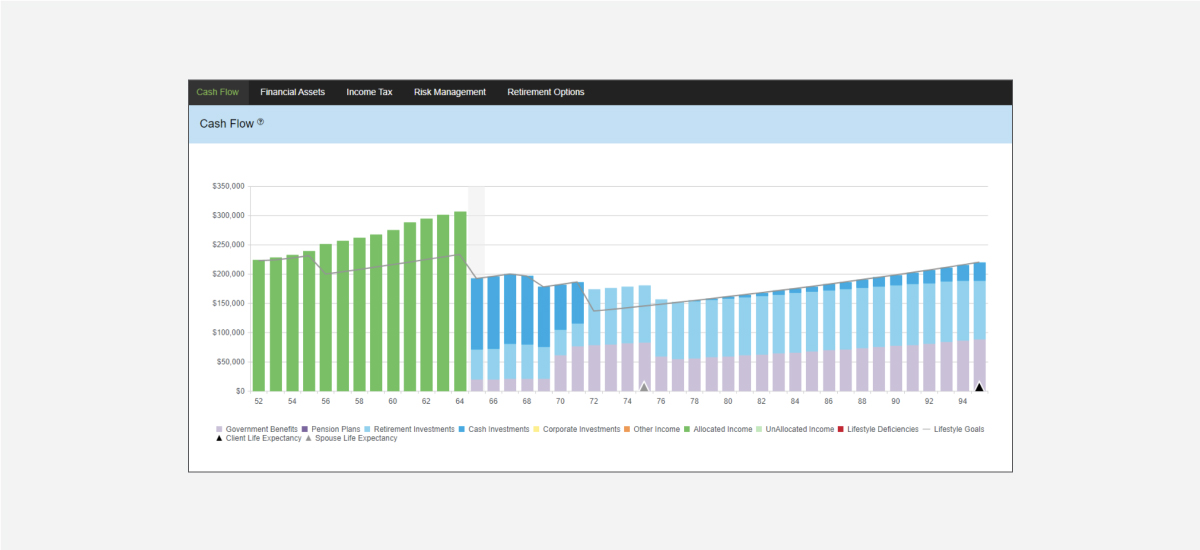
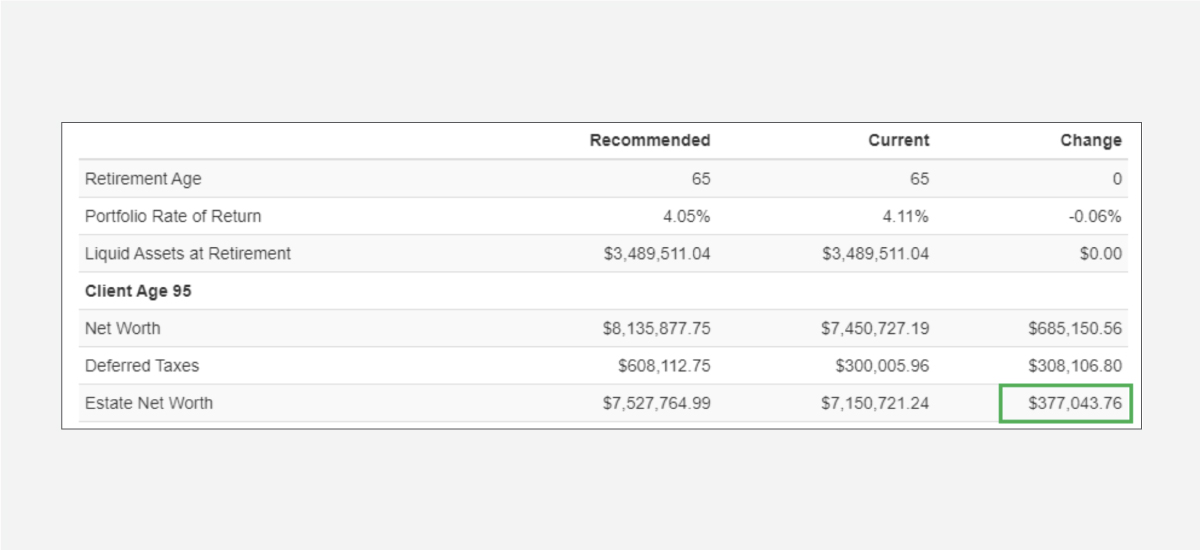
If they choose to withdraw Non-Registered / TFSA first, they can continue to fund their retirement lifestyle objectives and increase their final year estate value. By comparing scenarios, you will see that this change has added $377,043 to their Estate Net Worth at Sam’s age 95.

What other recommendations can be applied to help Sam and Michael maximize the value of their estate? You can create any number of new scenarios to test out your solutions and create a plan that will work for them.

Problem setting

Current Situation:

Having solved for maximum lifestyle without contributing to TFSA, we can see in the

Cash Flow

chart that from age 60 to age 95 there are no lifestyle shortfalls. We can also see the income allocation between government benefits, RRIF minimum, and non-registered withdrawals.

If we review the

Retirement Options

chart, we can see all 4 retirement options are in perfect balance having been automatically solved by RazorPlan.


Recommendations:

Now that we have determined the maximum lifestyle available according to our assumptions, we can choose to automatically re-balance Non-Registered assets to TFSA up to the maximum permitted each year. To do this, we will create a new scenario and set TFSA Auto Allocate from No to Yes.


Delivering Results

The best way to see the results of maximizing TFSA contributions throughout retirement is to view the Retirement Options chart.

In Option #3 we can clearly see that the tax efficiency of maximizing contributions to TFSA have created a Risk Alpha of 0.24% (4.00% – 3.76%).

This means that Mary could spend $2,000 more each year as seen in Option #1, or spend up to $66,400 in a lump-sum at retirement, as seen in Option #4, and still have enough to meet her lifestyle goal.


How To Build with RazorPlan:

Key Assumptions:

This case is assumed to have the following account level assumptions. To replicate this case as outlined below, be sure to update your

Account Settings

to match through

Your Account

Additional steps may be required if you do not choose to set up your account this way.

Set

Stop Income At

to

Assumed Life Expectancy

Set Pre-Retirement Cash Flow

to

On

Select Razor Academy from the RazorPlan home screen. From there select “Auto Allocate TFSA” and click Download. The sample case will download to your RazorPlan account and automatically open.

To calculate the maximum lifestyle in retirement, ensure the Monthly After-Tax Lifestyle is set to a value of $0.00 under the “Active Retirement” data column.

With Retirement Lifestyle set to $0.00, click on the Chart icon to have RazorPlan automatically solve for a Lifestyle Goal that liquidates all investment assets at the plan life expectancy.

Click the

Scenario

drop-down menu and select Copy Scenario. Name this new scenario “Maximize – TFSA”. Once created the new scenario will load.

With the new scenario active, go to Data Entry Step 3: Personal Assets and under the TFSA tab, change the Auto Allocate value from No to Yes.

With TFSA Auto Allocate set to Yes, click on the

Chart

icon on the RazorPlan Toolbar to have RazorPlan re-calculate the analysis and take you to the Cash Flow chart. Next, select the Retirement Options chart to see the value (Alpha) added by the change made.

In this example, the simple recommendation to take full advantage of TFSA contributions throughout retirement, gives the client more options and greater income security.

Problem setting

Current Situation:

Having solved for maximum lifestyle without contributing to TFSA, we can see in the

Cash Flow

chart that from age 60 to age 95 there are no lifestyle shortfalls. We can also see the income allocation between government benefits, RRIF minimum, and non-registered withdrawals.

If we review the

Retirement Options

chart, we can see all 4 retirement options are in perfect balance having been automatically solved by RazorPlan.


Recommendations:

Now that we have determined the maximum lifestyle available according to our assumptions, we can choose to automatically re-balance Non-Registered assets to TFSA up to the maximum permitted each year. To do this, we will create a new scenario and set TFSA Auto Allocate from No to Yes.


Delivering Results

The best way to see the results of maximizing TFSA contributions throughout retirement is to view the Retirement Options chart.

In Option #3 we can clearly see that the tax efficiency of maximizing contributions to TFSA have created a Risk Alpha of 0.24% (4.00% – 3.76%).

This means that Mary could spend $2,000 more each year as seen in Option #1, or spend up to $66,400 in a lump-sum at retirement, as seen in Option #4, and still have enough to meet her lifestyle goal.


How To Build with RazorPlan:

Key Assumptions:

This case is assumed to have the following account level assumptions. To replicate this case as outlined below, be sure to update your

Account Settings

to match through

Your Account

Additional steps may be required if you do not choose to set up your account this way.

Set

Stop Income At

to

Assumed Life Expectancy

Set Pre-Retirement Cash Flow

to

On

Select Razor Academy from the RazorPlan home screen. From there select “Auto Allocate TFSA” and click Download. The sample case will download to your RazorPlan account and automatically open.

To calculate the maximum lifestyle in retirement, ensure the Monthly After-Tax Lifestyle is set to a value of $0.00 under the “Active Retirement” data column.

With Retirement Lifestyle set to $0.00, click on the Chart icon to have RazorPlan automatically solve for a Lifestyle Goal that liquidates all investment assets at the plan life expectancy.

Click the

Scenario

drop-down menu and select Copy Scenario. Name this new scenario “Maximize – TFSA”. Once created the new scenario will load.

With the new scenario active, go to Data Entry Step 3: Personal Assets and under the TFSA tab, change the Auto Allocate value from No to Yes.

With TFSA Auto Allocate set to Yes, click on the

Chart

icon on the RazorPlan Toolbar to have RazorPlan re-calculate the analysis and take you to the Cash Flow chart. Next, select the Retirement Options chart to see the value (Alpha) added by the change made.

In this example, the simple recommendation to take full advantage of TFSA contributions throughout retirement, gives the client more options and greater income security.