Customer Success Manager at RazorPlan, Objectway
A Certified Financial Planner that has been working with other financial planners to grow their business and deliver financial plans to their clients. As a veteran of the financial planning software industry, Mike can provide a wealth of knowledge about building financial plans and identifying opportunities.
Razor Leads is a feature of the RazorPlan program that can be used to touch base with existing clients and introduce the planning process to prospective clients. This feature is available for all RazorPlan users and when activated a custom Razor Leads landing page is created. The video below outlines what Razor Leads is and how to activate this feature in RazorPlan.

Used properly the Razor Leads landing page can become a significant part of your client acquisition process. As outlined in our Prospecting with Razor Leads series, a three part blog previously published on RazorPlan.com:
- Prospecting with Razor Leads: Part 1
- Prospecting with Razor Leads: Part 2
- Prospecting with Razor Leads: Part 3
The rest of this article focuses on how to use Razor Leads and gives valuable tips on how to get your Razor Leads landing page in front of both clients and prospects.
Setting Up Razor Leads
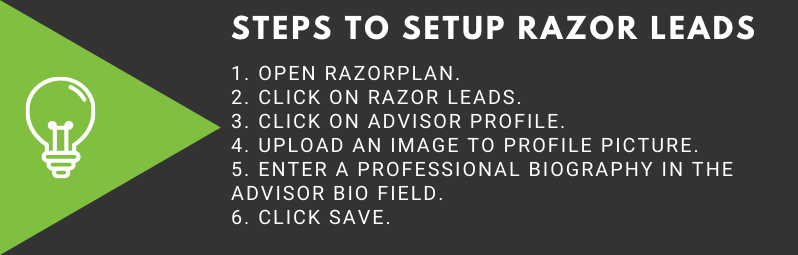
Once Razor Leads is activated, an advisor profile needs to be set up. The Advisor Profile window is where advisors upload an image and write a biography that is displayed on the Razor Leads landing page. A personalized link to this landing page is then provided and can be sent to both clients and prospects.
The Client Experience
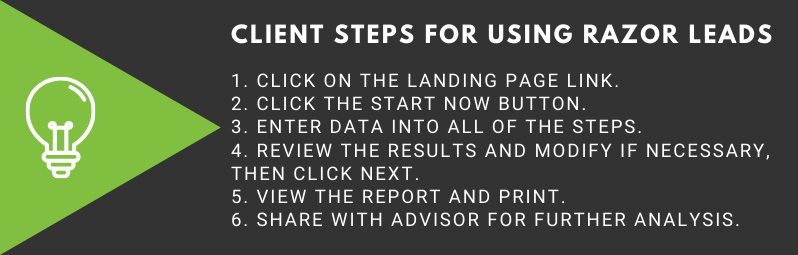
The Razor Leads landing page is client facing and walks the client through providing information about their life stage, ages, incomes and current assets. The client will then be shown their potential retirement income and can produce a personalized retirement income report based on the information they entered. The last step for the clients is to share their data entered on the landing page with you.
Accepting a Lead in RazorPlan
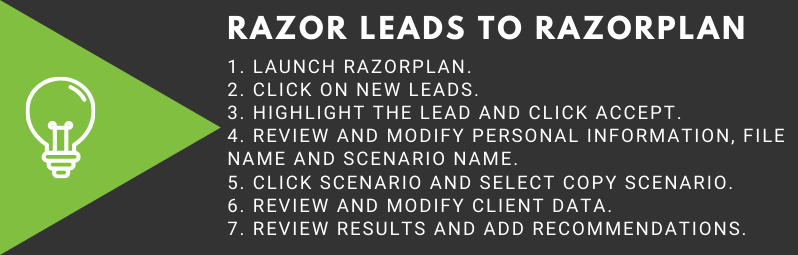
The goal of using Razor Leads is to get clients to share some of their financial information with you, once that data is shared you can begin the planning process. The following video outlines the best practices to take the data from Razor Leads to create a financial plan.
Using Razor Leads with Existing Clients
Sending the Razor Leads landing page to your existing clients can be a great way to touch base with them virtually and strengthen your relationships. By sending an email with the link to your landing page, your client activity will increase and you may uncover information the client previously had not told you about.

Using Razor Leads with Prospective Clients
Getting the Razor Leads landing page in front of prospective clients should be part of your larger client acquisition process. Adding the Razor Leads links to articles you post, or share on various social media programs is a great way to drive prospective clients to your landing page. Anywhere you market your services online is a great place to include the option for people to calculate their retirement income using your Razor Leads link. The video below outlines an example of adding the Razor Leads link to a LinkedIn article.
Additional Resources
When using Razor Leads it is good to have access to a few additional resources that can help when posting to social media or when creating emails. When posting to social media images are a vital part of every post, studies show that posts with an image are more likely to be engaged than simple text posts. When adding images you want to use royalty free images or purchase the rights to use the image. Here is a list of free stock image websites that could be useful when adding images to your posts:
The Razor Leads landing page can be a powerful tool in your client acquisition and servicing processes. By using the tools and tips provided here with your acquisition process you will see growth in your business. If you need help or have any questions about the Razor Leads area of RazorPlan please contact our support team.
Recent Posts

Improve Client Investment Planning with RazorPlan’s New Individual Assets Feature

Why business owners’ biggest planning gap comes after the sale

Protecting your Legacy: Planning for Private Company Shares

Optimizing your Retirement Strategy with RazorPlan Decumulation
Categories